Control Station
Control desk, monitor wall and terminal: see every value of the base on large screens and control everything – with an IC10 terminal and IC10 chips in the desk.
Tools
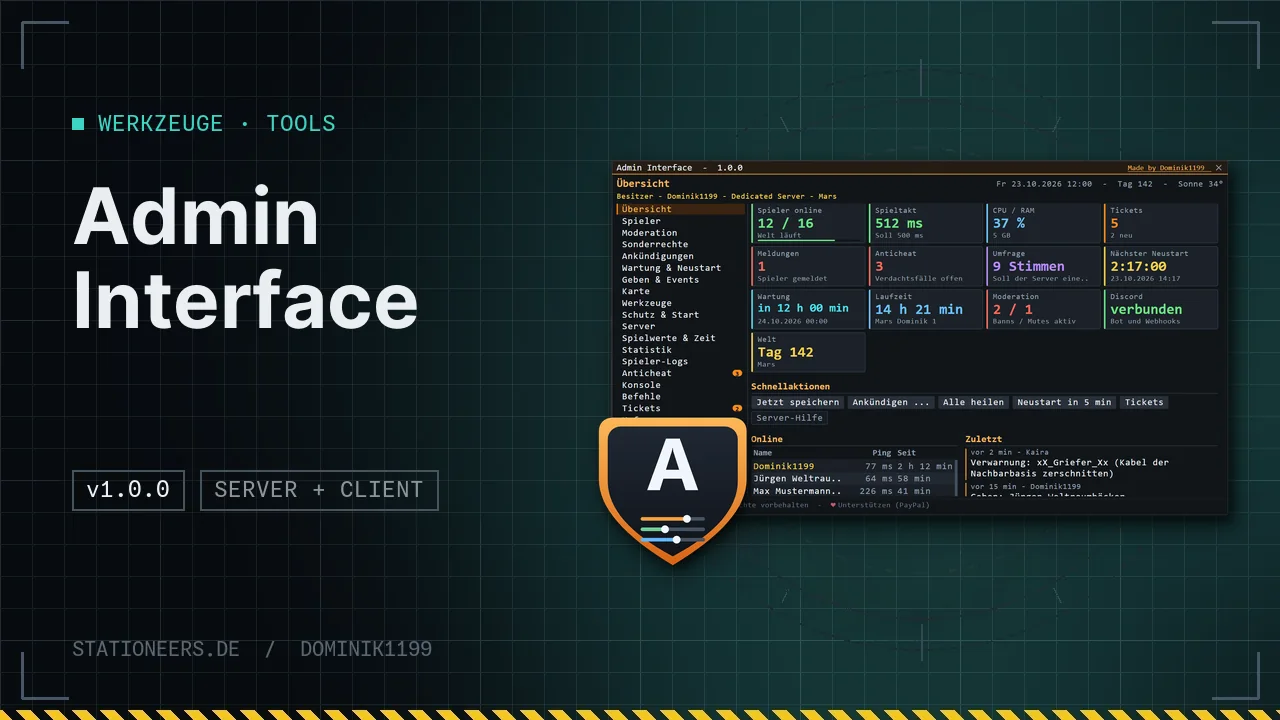
Run your server in game: roles and rights, moderation, per-player abilities, announcements, maintenance and restarts, statistics, player logs, anticheat, Discord – plus a server help with tickets and polls for everyone.

Running a Stationeers server so far means console commands, text files and a good memory. Admin Interface puts everything into one large window in game – in the Stationeers look, in German and English by game language.
For admins (Ctrl+U or admin): owner, admin and moderator roles with a rights matrix per area, optional admin password (it never leaves your own computer). Players and moderation with kick, ban and temp ban (the reason shows when connecting), mute, warnings with automatic consequences, notes, whitelist, build lock, freeze, teleport, heal and inventory. Per-player abilities – godmode, creative building, infinite tools, vanish, fly, give, demolish, admin mode – “self only” or “others too”, with expiry and reason.
Plan and operate: announcements now, scheduled or recurring, welcome message, maintenance windows with maintenance mode, restart countdown and daily restarts with the included start scripts. Gift events with an item catalog (search in German and English, mod items too), a map with players and waypoints, tools to clean up and demolish, game values and stack sizes per save, time of day and storms, statistics with a 24-hour history, player logs with timeline and export, an anticheat that only reports by default, console and command list, Discord webhooks and a bot with slash commands.
For every player (Ctrl+Y or support): the server help with support tickets (answers even while offline), polls, rules, news, calendar, “report a player” and your own abilities. Plus a HUD clock with notices for restart, maintenance, event and poll.
Keys: both follow the labels on your keyboard – QWERTZ and AZERTY too –, never fire while you type and can be changed in the LaunchPad menu (AdminTaste/AdminZusatz, HilfeTaste/HilfeZusatz). Clock and buttons on the HUD stay below all windows.
Built safely: the server checks every action itself – the connection decides who you are, never the other player. Token, webhooks and password stay on the server.
Multiplayer: the server and all players need the mod in the same version; it adds no items. With Banking System, Skill & Level System, Roleplay & Permissions and Exploration their features show up in the interface.
Full guide with dedicated server setup and Discord bot: Admin Interface in the wiki
Before you open a ticket: the problem may already be known – with status and workaround.
No known issues right now.
Not listed? Report a bugFirst release: admin window with roles, rights and optional password, moderation, per-player abilities, announcements, maintenance and restarts, give and events, map, tools, game values, statistics, player logs, anticheat, anti-griefing, start landers, console, Discord and audit log; server help with tickets and polls; HUD clock.
In single player and as host you are the owner automatically. On a dedicated server you add yourself at the server console: admin add <your Steam ID> owner – the 17 digits are in your Steam profile link, for example. On public servers then set an admin password with admin password <password>, because the dedicated server does not have Steam confirm the Steam ID of a connection. More in the guide.
The keys follow the labels on your keyboard, QWERTZ and AZERTY too, and never fire while you type in the console, chat or a text field. Change them in the LaunchPad menu under AdminTaste/AdminZusatz and HilfeTaste/HilfeZusatz; as a fallback the console commands admin and support open the windows. If Ctrl+U shows “Admins only”, you are not an admin on this server – the server help with Ctrl+Y still works.
A mod can only stop the server. Starting it again is the job of a start script: copy Start-Admin-Interface.bat (Windows) or start_admin_interface.sh (Linux) from the mod folder next to the server, fill in save and world at the top and from now on start the server with it. The interface then shows “watchdog active”. See Restarts with a start script.
Not by itself: every check is set to “report only” by default. Reactions such as kick or ban are set by the admin. Players with matching abilities, moderators and admins are exempt, and teleport, respawn, sitting or lifts do not count as violations. A case can be marked as “false alarm”; if they pile up, the interface suggests adjusting the limit.
No. The logs – sessions, chat, deaths and build actions with location, no IP addresses – are kept only on the game server in BepInEx\config\AdminInterface\, and its operator is responsible for them. Nothing is sent to me or to stationeers.de. Chat is deleted after 7 days, the rest after 30 (adjustable); the operator can delete all data of a player with one click. Direct questions about your data to the operator. More under Privacy for server operators.
Control desk, monitor wall and terminal: see every value of the base on large screens and control everything – with an IC10 terminal and IC10 chips in the desk.
Desks, wall panels and cabinets with a module field – fitted with buttons, switches, dials, displays, gauges, traffic lights and more, every module an IC10 device of its own.
One grip, nine game tools – from wrench to mining drill, in three tiers with batteries and a lamp attachment.
Stationeers · Mods · IC10 · Website
What would you like to know?
Ask about game mechanics, Dominik’s mods or this website – or have the IC10 expert write a chip for you.
Sign in to use the chatbot.